
Credentialing & Compliance
for staffing agencies.
Zero non-compliant placements. Automated.
The StaffingOS Credentialing and Compliance module is automated credential management software built for staffing agencies. Every license, certification, background check, and permit is tracked per worker, assigned to specific job types and clients, and enforced at the moment of placement. Non-compliant placements are blocked before they happen, not discovered after.
See Credentialing in Action.png)
The Problem
Why manual credential tracking
fails staffing agencies.
Most staffing agencies still manage worker credentials the same way they did ten years ago: spreadsheets, paper copies, and a recruiter who remembers to check before a shift. That works until it doesn't. A single non-compliant placement can trigger client penalties, regulatory action, or worse.
The problem compounds as you grow. More workers, more clients, more credential types, more jurisdictions. The ceiling on manual staffing compliance tracking is low. The consequences of hitting it are severe.
Expired license missed because someone forgot to check
Non-compliant worker placed because a spreadsheet wasn't updated
Background check lapsed between assignments. Placement went through anyway.
Client audit reveals credential gaps across a dozen placements
How It Works
Credentials assigned to jobs & shifts.
Enforced at placement.
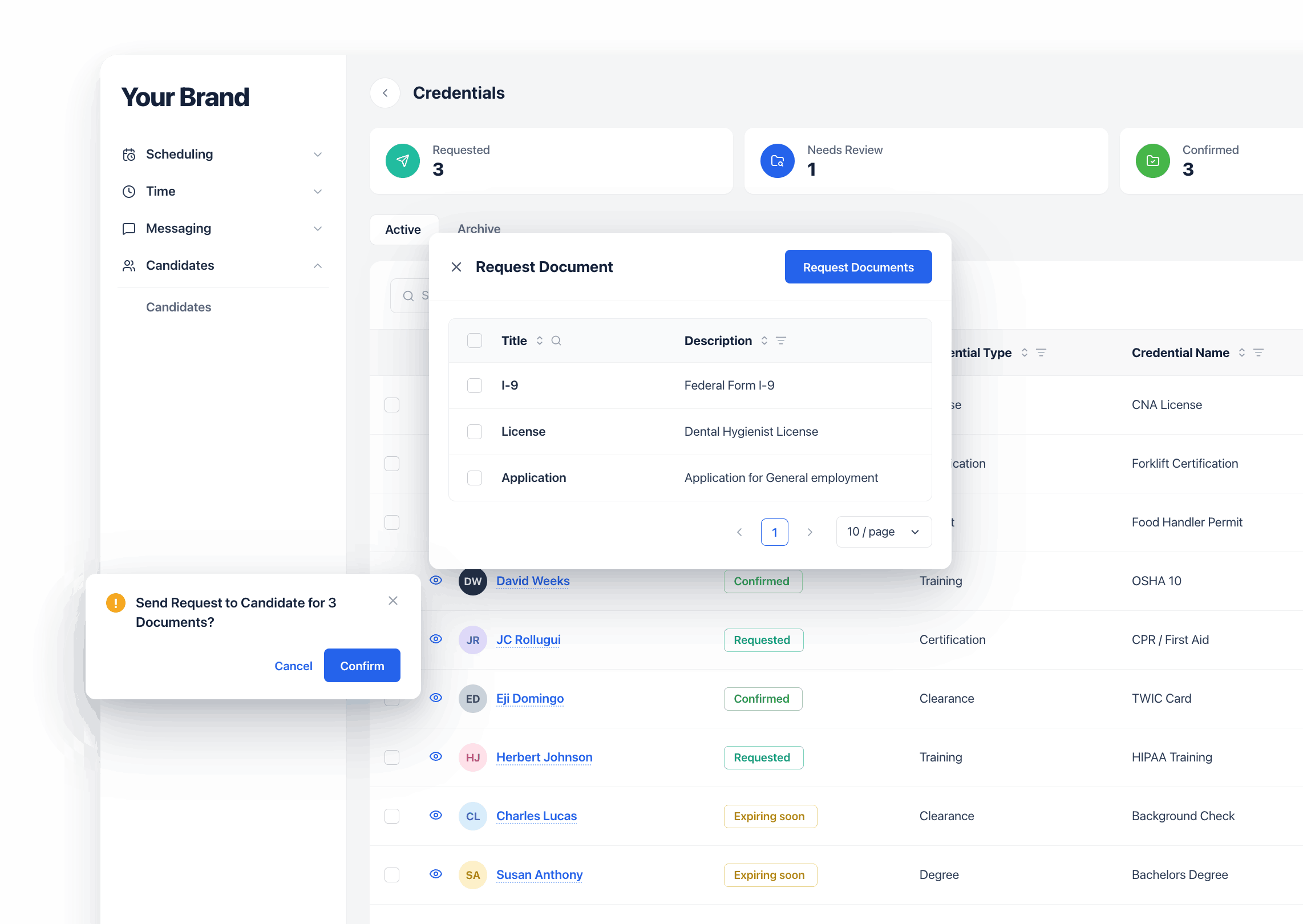
StaffingOS ties placement compliance to the job or shift, not just the worker. When a recruiter attempts to place a worker, the system checks every requirement in real time and flags the placement immediately if anything is missing or expired.
Define requirements
Set the credential requirements for each position type and client: licenses, certifications, background checks, permits, and drug screens.
Workers complete credentials
Workers upload documents and complete required checks during digital onboarding. Everything is stored and verified in the platform.
System checks at placement
When a recruiter assigns a worker to a shift or job, the system automatically verifies every credential requirement in real time.
Compliance enforced at placement
Missing or expired credentials trigger an immediate alert. Any override requires explicit authorization and is logged.
What's Tracked
Credential types tracked,
verified, and enforced.
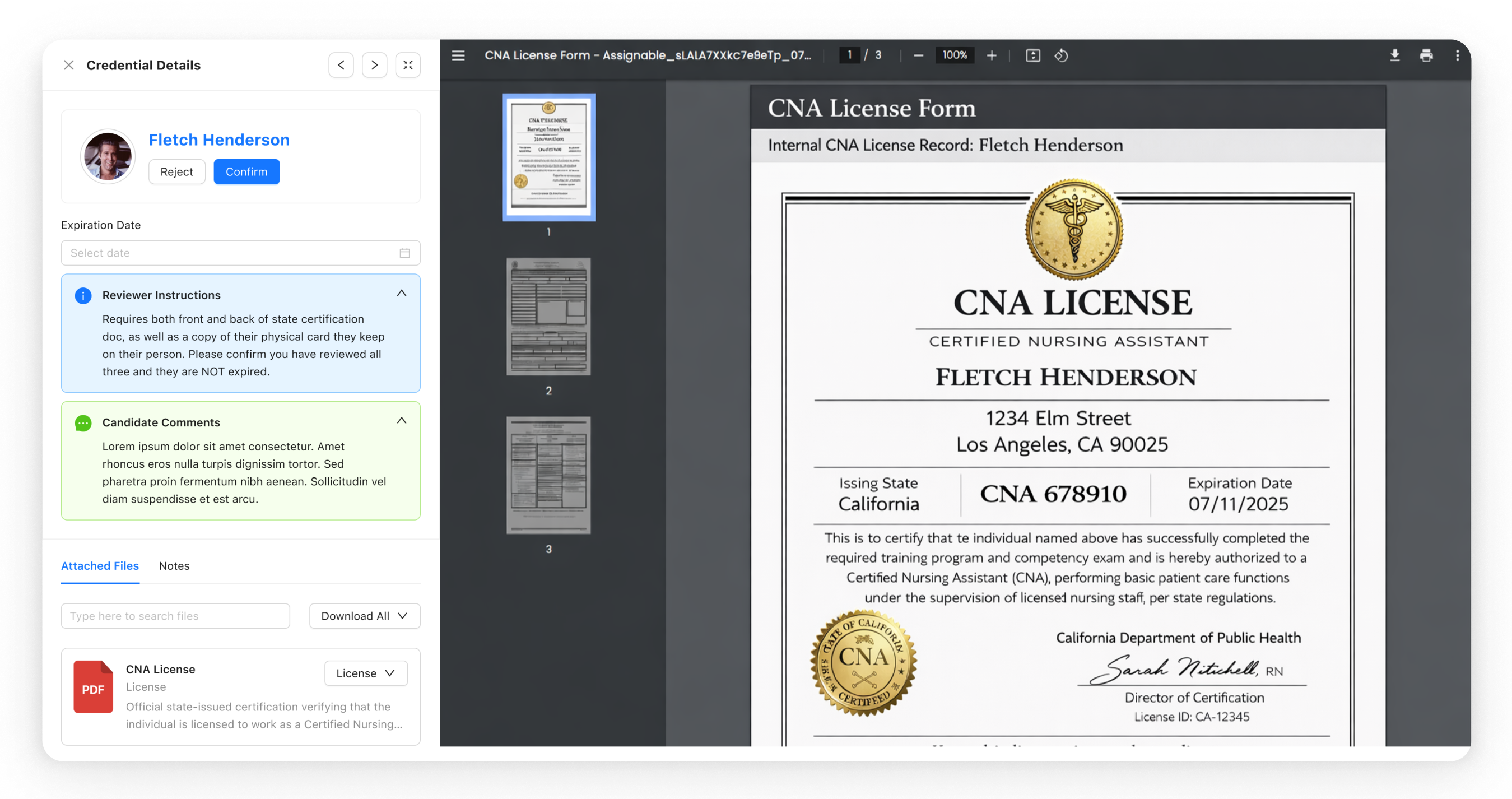
From nursing licenses to forklift certifications to OSHA cards, StaffingOS automated credential tracking covers every requirement. Select a category to see the full scope of staffing compliance enforcement.
Professional licenses
State-issued licenses tracked by type, number, issuing state, and expiration date. Auto-alerts sent to workers and recruiters before renewal deadlines.
Automated Alerts
How StaffingOS automates
credential expiry alerts.
StaffingOS sends automated credential expiry alerts to workers and recruiters as certifications and licenses approach expiration, with enough lead time to renew before a shift is impacted. Nothing expires quietly.
Workers are notified through the mobile app when credentials are approaching expiry, with direct links to renew.
Recruiters see credential expiry warnings in the console before a placement is attempted, not after the fact.
Expired credentials trigger automatic placement blocks. Overrides require explicit authorization. Every exception is logged for audit accountability.
Powered By
Verified by best-in-class partners.
Background checks via Yardstik and work authorization via E-Verify, integrated natively so results flow directly into each worker's compliance profile. No re-keying, no separate logins.
View all integrationsOften Used With
Modules often used with Credentialing and Compliance
Digital Onboarding
Workers complete credential uploads and background checks during onboarding, before their first shift.
Explore →Worker Mobile App
Workers receive credential expiry alerts and upload renewal documents directly from the app. No office visit required.
Explore →Recruiter Console
Recruiters see real-time compliance status at the point of placement. Expired credentials block the assignment automatically.
Explore →FAQ
Common questions
Does StaffingOS include credential tracking and compliance management?
Yes. StaffingOS includes a full Credentialing and Compliance module. It tracks licenses, certifications, background checks, drug screens, E-Verify status, and client-specific permits per worker. Credentials are assigned to specific job types and clients, verified at the moment of placement, and blocked automatically when expired or missing.
How does StaffingOS prevent non-compliant placements?
StaffingOS enforces credential requirements at the point of placement. When a recruiter attempts to assign a worker to a shift or job, the platform automatically checks every credential requirement for that position type and client in real time. If any credential is expired, missing, or pending, the placement is blocked. Any override requires explicit authorization and is logged.
What types of credentials does StaffingOS track?
StaffingOS tracks professional licenses (RN, LPN, CDL, and others), industry certifications (CPR, BLS, OSHA 10 and 30, forklift), background checks via Yardstik, drug screening results, E-Verify work authorization, and client-specific permits and clearances such as facility access badges and safety orientation sign-offs.
Does StaffingOS integrate with background check providers?
Yes. StaffingOS integrates natively with Yardstik for automated background check ordering, status tracking, and results. Requirements are set per position type, shift, or client. Results flow directly into the worker's compliance profile with no re-keying or separate logins.
Does StaffingOS support E-Verify for work authorization?
Yes. StaffingOS includes integrated E-Verify for work authorization verification. Results are tied to the worker's compliance profile and factored into their placement readiness status, so placements never go through with unverified workers. Re-verification for expiring documents is also tracked.
Next module and next steps
Next Module
Omnichannel Messaging
One inbox for every channel: email, SMS, WhatsApp, and in-app chat. AI handles the routine so your team handles what matters.
Explore Omnichannel Messaging →Ready to See It?
See compliance enforced automatically.
We'll walk you through how credentials are tracked, enforced, and renewed, without your team lifting a finger.
See Credentialing in Action